
Fawn is the second lab that HTB gives us to learn from, it gives us an insight of what FTP is and how it could be used for compromising systems. First, lets understand what FTP even is!
ʕっ•ᴥ•ʔっ
What is FTP?
“The File Transfer Protocol (FTP) is a standard communication protocol used to transfer
computer files from a server to a client on a computer network. FTP is built on a client–
server model architecture using separate control and data connections between the client
and the server. FTP users may authenticate themselves with a clear-text sign-in protocol,
generally in the form of a username and password. However, they can connect anonymously if
the server is configured to allow it. For secure transmission that protects the username
and password and encrypts the content, FTP is often secured with SSL/TLS (FTPS) or
replaced with SSH File Transfer Protocol (SFTP).”
My understanding of the explanation paragraphs (within the write up)
FTP (File Transfer Protocol) is one of the oldest methods for transferring files across a network, and while widely used, it is also often misconfigured. Because of its simplicity, employees or administrators might leave it unsecured, either unintentionally or for convenience, which can create significant security risks. For example, attackers could access sensitive logs or configuration files, giving them insights into usernames, active services, and the overall structure of a network.
FTP works on a client–server model, where the client uploads or downloads files to and from a central server. Clients may log in with usernames and passwords, or sometimes even anonymously if the server allows it. However, since standard FTP sends data in plaintext, it is vulnerable to interception. To address this, secure alternatives like FTPS (FTP over SSL/TLS) or SFTP (SSH File Transfer Protocol) are often used, which encrypt the communication and protect against man-in-the-middle attacks.
Services like FTP run on ports, which allow multiple processes to function simultaneously within a single host. For example, a server could have FTP active on port 21, SSH on port 22 for remote management, and HTTP on port 80 for serving web content. While this setup can be convenient, leaving FTP unencrypted and exposed can be a serious weakness. In this exercise, the focus is on examining a simple, misconfigured FTP service to understand how such vulnerabilities might appear in a real-world environment.
Enumeration
The first step we do is to ensure that our VPN connection is established. A quick way to do this is by using the ping protocol, which sends a small amount of data to the target and waits for a response. This low-overhead method provides a fast check without requiring a full scan. The command format is ping {target_IP}, where {target_IP} is the address of your assigned machine on Hack The Box.
However, it’s worth noting that in larger corporate environments, ping responses are often blocked by firewalls! This is done to reduce the risk of insider threats and to prevent attackers from easily discovering other hosts and services within the network.
Now lets first click onto the ‘parrot Terminal’ and ping our IP address.

Using the short cut of ‘ctrl +c’ would cancel the ping command, but then it would just go on and on and on. My rule of thumb is if it pings 4 times we can confirm a connection is established via the VPN tunnel we have formed. Now we can start scanning for the open services within our host.
The next command would be ‘Sudo nmap {Target_IP}. Remembering what nmap is, is an open source network scanner. ‘Sudo’ being the command to do a basic scan of open ports with the ip address

We can see that the open port within the network is ‘ftp’ at port 21. Now lets get what version of FTP they are using. Knowing the version helps us be able to have some understanding of what vulnerabilities that port may have. The way this is done is though adding ‘-sV’
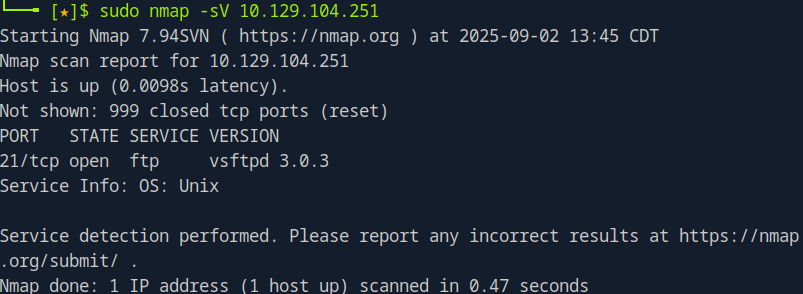
‘-sV’ switch stands for version detection. Using a version-detection switch in a scan makes the process slower but provides valuable information about the exact service and version running on an open port. This helps us quickly identify whether outdated or vulnerable software is in use. While we won’t focus on exploiting the service directly (at this moment) , gathering version details is an important step. It allows us to interact with the service more effectively and plan the best approach for investigating the target.
Now that is done, its time to interact with the FTP service. The way this is done is through using the ‘ftp’ command within the parrot terminal, but first we must ensure that ftp service is installed. This is done through the following command:
‘Sudo apt install -y’
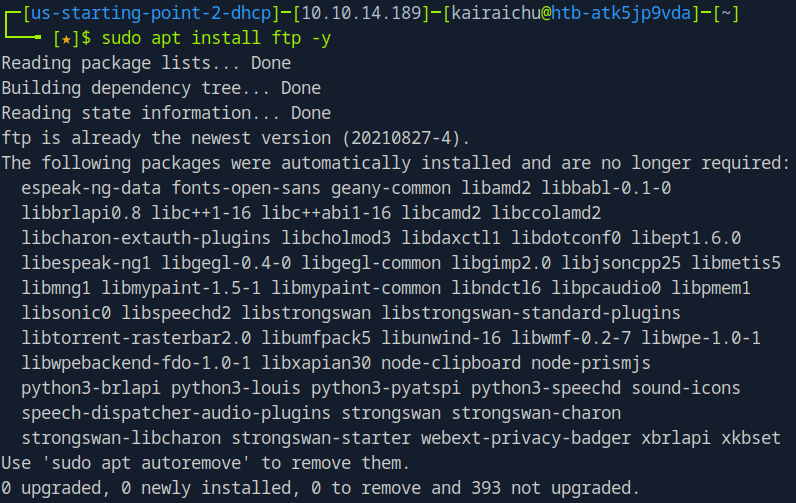
The ‘-y’ switch is used to accept installation without any confirmations interrupting the installation process.
Next lets see what the FTP services are capable off, we do this by using this command. ‘Ftp -?’
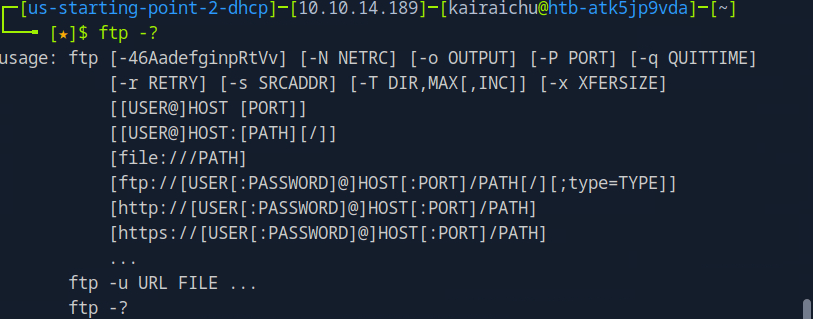
This command actually gives us an insight on how the command works, what the format is, the switches etc. We also know how to connect to the target host using the FTP command shown above. This initiates an authentication request to the FTP service, which then responds with a prompt on our machine.
We do this by ‘ftp {Target_IP}’ command.
Once that is done, it would prompt us to give a username and password. This is a very common misconfiguration that people leave out, leaving default login in details, making it vulnerable and easy to access.
For this Lab, the default credentials are the following
Username : anonymous
Password: anon123
After that is done, we hit enter and see that we have successfully logged in. The terminal changes to ‘ftp’, us now being able to use ftp commands.
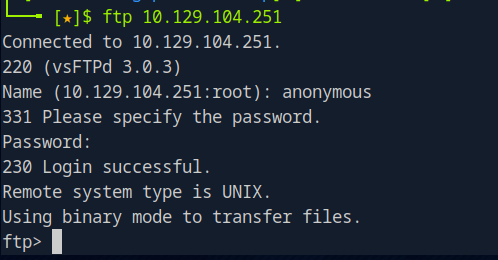
Next lets use the ‘help’ command lets us see all available commands for the ftp service. This is a common pattern across most scripts and tools such as typing -h, –help, or help will display a list of commands, sometimes with descriptions.
If you want more detailed information about a specific command, you can use man {commandName}.

The following pops up, showing the commands that we can use within. Commands like ‘ls’ and ‘cd’ are familiar to use, so lets us those to look into the contents the ftp’s folders

We can see that they have the flag.txt! Now let’s get it! We do this be using the ‘get’ command, so that it could be downloaded into our virtual machine
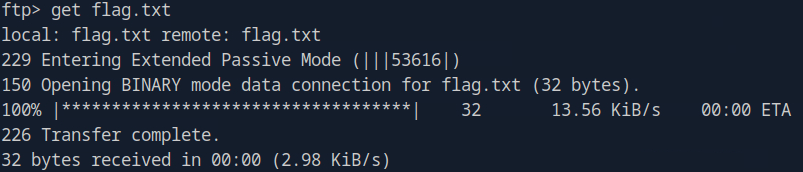
Now let’s get out of ftp. There are a few ways of doing this, such as ‘bye’ command or using the ‘ctrl +c’ shortcut.
Once that is done, let’s see the contents. We use the commands of ‘ls’ and ‘cat flag.txt’
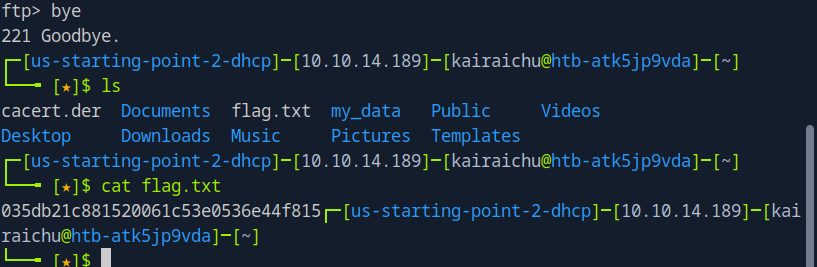
Nice! Time to submit the flag!
- blob:https://app.hackthebox.com/2fb16a87-03ab-4e47-9353-f53043c70034
- https://www.fortinet.com/uk/resources/cyberglossary/file-transfer-protocol-ftp-meaning#:~:text=FTP%20(File%20Transfer%20Protocol)%3A,network%2C%20such%20as%20the%20Internet. (Understanding FTP)
- https://www.youtube.com/watch?v=E-DLkxiFZ1Q (How to use FTP in linux)
That’s it for the machine, next post we shall explore the questions and answers of the quiz about Meow! Now let’s code ‘em all! ʕ -ᴥ•ʔ♡
 KaiRaiChu
Leave a comment